

Cogent™ NGS Discovery Software

Version 2.3

Overview

Cogent NGS Discovery Software (CogentDS) is bioinformatic software for user-friendly analysis of sequencing data generated with Takara Bio platforms. The Cogent NGS Analysis Pipeline (CogentAP) can be used to prepare files ready for import into CogentDS.

Supported applications

See a list of supported applications.


Installation instructions can be found in the Cogent NGS Discovery Software User Manual or Quick Start Guide. CogentDS includes the following files:

  • GUI launcher (via RStudio)
  • Example mini-datasets

More Information

Supported operating systems

  • Windows 11
  • macOS Mojave (v10.14) or higher
  • Linux CentOS 6.9 or higher

Hardware requirements

  • Standard analysis
    • Minimum: 8 GB RAM (Recommended: 16 GB)
    • >20 GB of free disk space
  • Shasta Total RNA-Seq data analysis
    • ≥64 GB RAM
    • >60 GB of free disk space

Additional third-party software dependencies*

  • R
  • RStudio Desktop

*Not included with the software; must be downloaded and installed separately. Refer to the user manual for the complete list and more information.

Additional product information

More information is available in the Cogent NGS Discovery Software User Manual or Quick Start Guide.

Cogent NGS Discovery Software version history

Version number Release date Notes
CogentDS v2.3 2026-04-21
  • New features:
    • Added new parameters to the CogentDS scDNA application [CNV mode] to provide more advanced control over barcode clustering and UMAP generation
    • Added predicted ploidy calculation as a fallback to support analysis outputs from Cogent NGS Analysis Pipeline version ≤ 3.2.31
  • Improvements:
    • Consolidated all QC functionality into the QC module and improved user guidance on included and excluded barcodes. QC filtering is now propagated across modules in the CogentDS scDNA application [CNV mode]
CogentDS v2.2.19 2025-11-17
  • New features:
    • Enabled faceting of UMAP overlays by user-selected SNVs within the scDNA application (SNV Mode)
    • UCSC Browser links for somatic SNVs displayed in the table in scDNA application (SNV Mode)
  • Improvements:
    • Updated stats tables of preliminary RNA analysis html reports for better user readability
      • Summary of Experiment
      • Sequencing Metrics
      • Mapping Metrics
    • Updated color scheme for Shasta WGA samples analyzed using the cogent dna analyze workflow 
  • Documentation:
CogentDS v2.2 2025-08-01
  • Added a single-nucleotide variant (SNV) analysis mode for downstream filtering and visualization of SNVs in the single-cell DNA (scDNA) application
  • Added additional parameters for controlling visualization in the single-cell RNA (scRNA) application
  • Added an optional batch correction step in the bulk RNA application
  • Updated barcode rank plot for filtering barcodes based on total reads and allowing users to select barcodes based on algorithm-defined knee/inflection point or user-controlled read cutoff
  • Prerequisites:
    • Requires R version 4.4 or 4.5
  • Documentation:
CogentDS v2.1 2025-01-17
  • Improved, simple user interface (UI)
  • Enhanced features for quality control and ambient RNA correction
  • Guided end-to-end scRNA, bulk RNA, and scDNA analysis
  • Data discovery and analysis support for Takara Bio mRNA and total RNA-seq, Shasta Whole-Genome Amplification, and 100,000 barcodes from Shasta Total RNA-Seq kits (supported applications)
  • Prerequisites:
    • Requires R version 4.4 or higher
    • Added XQuartz prerequisite for macOS support of scDNA analysis
    • Removed requirement for R devtools
  • Documentation:
    CogentDS 1.5
    (re-release)
    2023-05-26
    CogentDS 1.5 2021-12-03
    • Prerequisites:
      • Requires R devtools 2.4.2 or later
      • Requires R version 4.0.0 or higher
    • New features to support extended analysis options in Cogent NGS Analysis Pipeline:
      • Improved analysis of full-length transcriptome data: clustering by gene counts or transcript counts and transcript-count analysis reports
      • Report overlay options for gene fusions and immune clonotypes
    • Improved manual Quality Controls
    • Option to select previously used analysis parameters to streamline data import and get to the reports more quickly
    CogentDS 1.0 2020-09-11
    • Prerequisites:
      • Requires R devtools 2.1.0 or later
      • Requires R version 3.6.0 or higher
    • PCA options: visualize Principal Components using either the Uniform Manifold Approximation and Projection (UMAP, recommended) or the t-Distributed Stochastic Neighbor Embedding (t-SNE) method.
    • Documentation:
    hanta software 1.0 2019-06-07
    • Prerequisites:
      • Requires R devtools 2.0.1 or later
      • Requires R version 3.5.0 or higher
    • PCA options: visualize Principal Components using the t-SNE method only.
    • Documentation:

    More cells. More biomarkers. More discoveries.

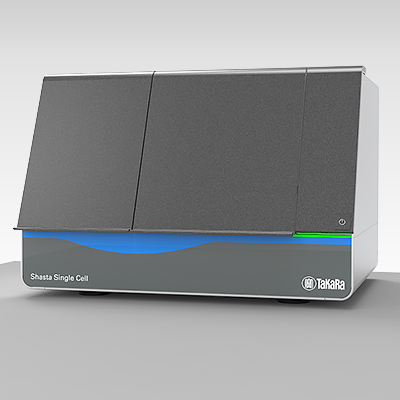
    Want to go from sample prep through data analysis with less hands-on time and stress? Meet the Shasta Single Cell System, which helps researchers find novel biomarkers. Learn how our high-throughput Shasta technologies can inspire the next breakthrough.

    Get the details


    Sign up to get Cogent NGS Discovery Software

    If you are interested in using CogentDS, please review the End User License Agreement (EULA) before populating the required fields of the form.

    After checking the box to indicate acceptance of the EULA and submitting the completed form, you will be directed to a page where you can download the software. Installation instructions can be found in the Cogent NGS Discovery Software User Manual or Quick Start Guide.